Home
Getting Started
My Profile
Sitting Courses
Managing People
Performance Reviews
Managing Courses
Creating and Managing Courses
Adding Rich Content to Courses
Making changes to an active course
Making courses available on demand
Creating an external link to a course or pack
Assigning categories to a course
Assigning Courses to Teams
Course Scheduling and Distribution
Downloading a Course as a PDF
Rewards for Courses
Course Content Review
External Courses
Course Templates
CPD
Professional Development Planning (PDP)
Account Page
Advisors and Clients
Learner Functionality
Turning Fortnightly Notifications On or Off
How to Turn Fortnightly Notifications On or Off
Follow the steps below to manage your fortnightly notifications in the Dacreed platform:
Log in to your Dacreed account.
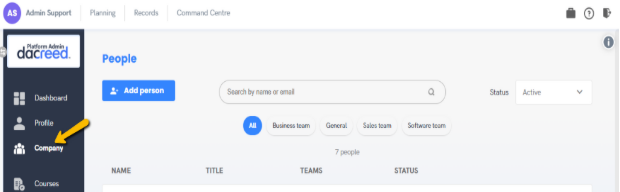
Click on the ‘Company’ tab in the main navigation.
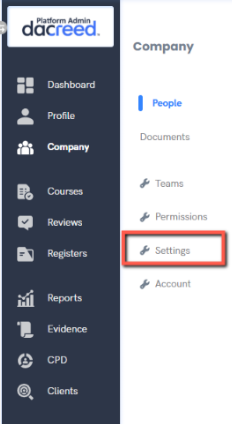
3. Select ‘Settings’ from the dropdown or sidebar menu.
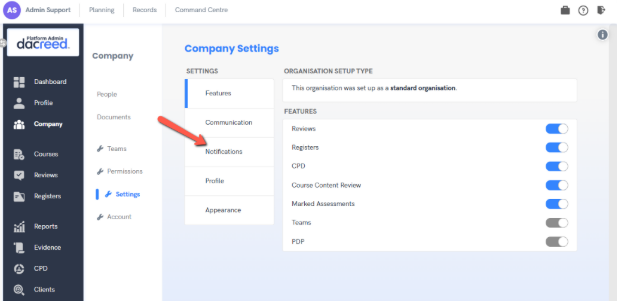
4. Go to the ‘Notifications’ section.
5. Toggle the radio button:
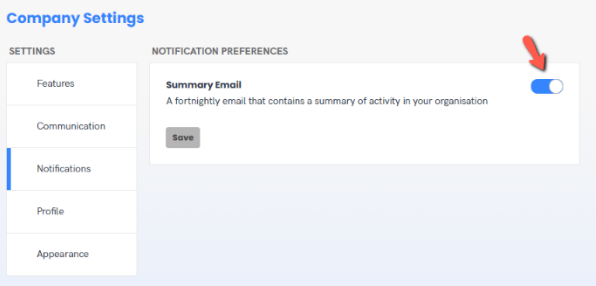
-Slide it to the right to turn notifications ON
-Slide it to the left to turn notifications OFF
Changes will be saved automatically.
Copyright © Dacreed 2022