Home
Getting Started
My Profile
My Company
Sitting Courses
Managing People
Performance Reviews
Managing Courses
Creating and Managing Courses
Adding Rich Content to Courses
Making changes to an active course
Making courses available on demand
Creating an external link to a course or pack
Assigning categories to a course
Assigning Courses to Teams
Course Scheduling and Distribution
Downloading a Course as a PDF
Rewards for Courses
Course Content Review
External Courses
Course Templates
CPD
Professional Development Planning (PDP)
Account Page
Advisors and Clients
Learner Functionality
Deleting an External CPD Entry
How to Delete an External CPD Entry
Go to the CPD section (bottom left-hand corner).
Click on "External CPD."
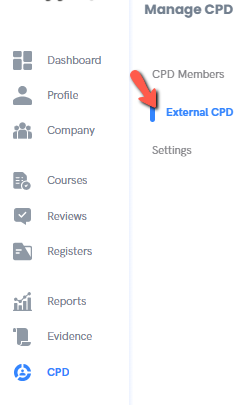
Find the entry you want to delete.
Click the three dots (⋮) next to the entry.
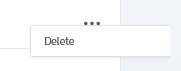
Select "Delete" from the menu.
Confirm the deletion if prompted.
Copyright © Dacreed 2022